
Sharing prototypes
Playground makes it easy to share your prototypes with others.
Once a prototype is generated, it’s hosted as a web-based preview that you can open, test, and share via link.
Publishing a prototype
When your prototype is ready, you can publish it with a single action.
Publishing creates a shareable link that points to the live prototype. Anyone with the link can open and interact with it in their browser. No ChatNow account is required to view a shared prototype.
During publishing, you may briefly see a message like “Generating fix…”. This is part of the process and means Playground is applying small adjustments to ensure the prototype runs correctly. No action is required, and publishing will continue automatically.
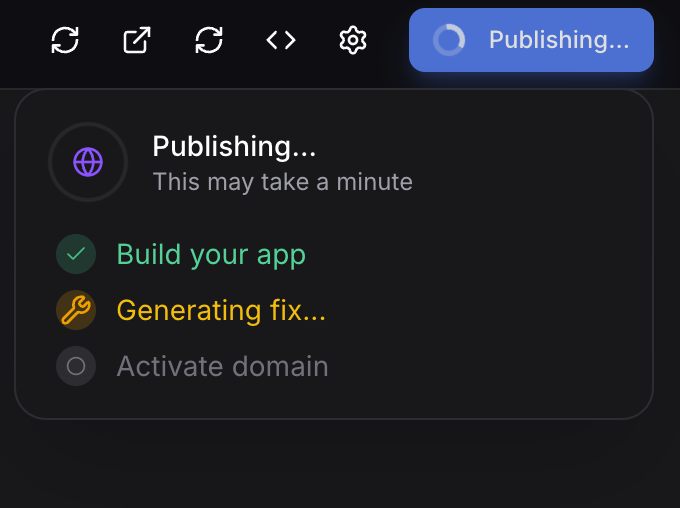
Sharing with others
You can share your prototype by copying and sending the preview link.
This is useful for:
Getting feedback from teammates or clients
Demonstrating an idea or concept
Testing usability or interactions
Sharing early-stage work quickly
Shared prototypes are viewable on most modern browsers.
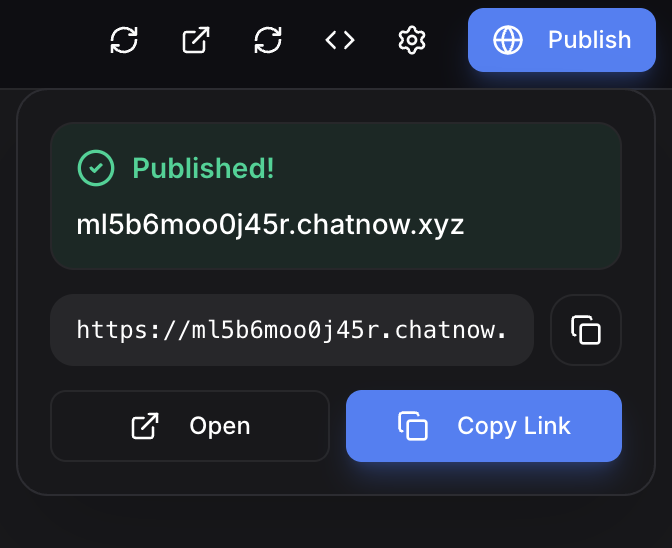
What others can do with a shared prototype
People who open a shared prototype can:
View the prototype
Interact with its interface
Test basic functionality
They cannot edit the prototype or access your Playground workspace.
Limitations of shared prototypes
Shared prototypes are intended for viewing and interaction only.
Prototypes are static and web-based
There is no backend or persistent data
Changes made after sharing require republishing to update the link
These limitations are expected and not bugs.
When sharing works best
Sharing prototypes works best when:
You want quick feedback
You’re validating an idea
You’re demonstrating a concept or flow
For production-ready apps or live services, Playground is not intended as a deployment platform.
Common questions
Do people need a ChatNow account to view a prototype?
No. Anyone with the link can view and interact with it.
Can others edit my prototype?
No. Shared prototypes are view-only.
Does sharing use credits?
No. Credits are used when generating or updating prototypes, not when sharing them.
What next?
If you want to keep building, return to Creating interactive prototypes.
To explore other tools, see AI Assistant (Chat) or Creative Studio.