
Credits & usage
Credits are used in ChatNow to power image and video generation in Creative Studio.
What uses credits
Credits are consumed when you generate:
Images from text
Edited images (image-to-image)
Videos from text or images
Any action that produces an image or video uses credits.
What does not use credits
Using the AI Assistant (Chat) does not consume credits.
Text-based chat is unlimited
You can send as many messages as you want
There is no usage cap for conversations
Credits are only used for image and video generation in Creative Studio.
How credits work
Credits are included with your subscription and renew automatically depending on your subscription plan.
Credits renew monthly for yearly plans
You can purchase additional credit packs if you use up your allowance
Unused credits do not roll over, unless explicitly stated otherwise.
Credits cannot be manually refunded or re-added.
When credits are consumed
A generation attempt consumes credits once the request is processed, even if:
The result is poor
The output doesn’t match expectations
You retry, or regenerate
This behaviour is expected and not considered a bug.
Why credits can’t be refunded
Image and video generation require significant computing resources. Once a generation request is processed, those resources have already been used.
Being aware of this helps avoid unnecessary retries and wasted credits.
Credit usage varies by model
Different models consume different amounts of credits.
In general:
Image generation uses fewer credits than video generation
Video generation uses significantly more credits than images
More advanced models may consume more credits per generation
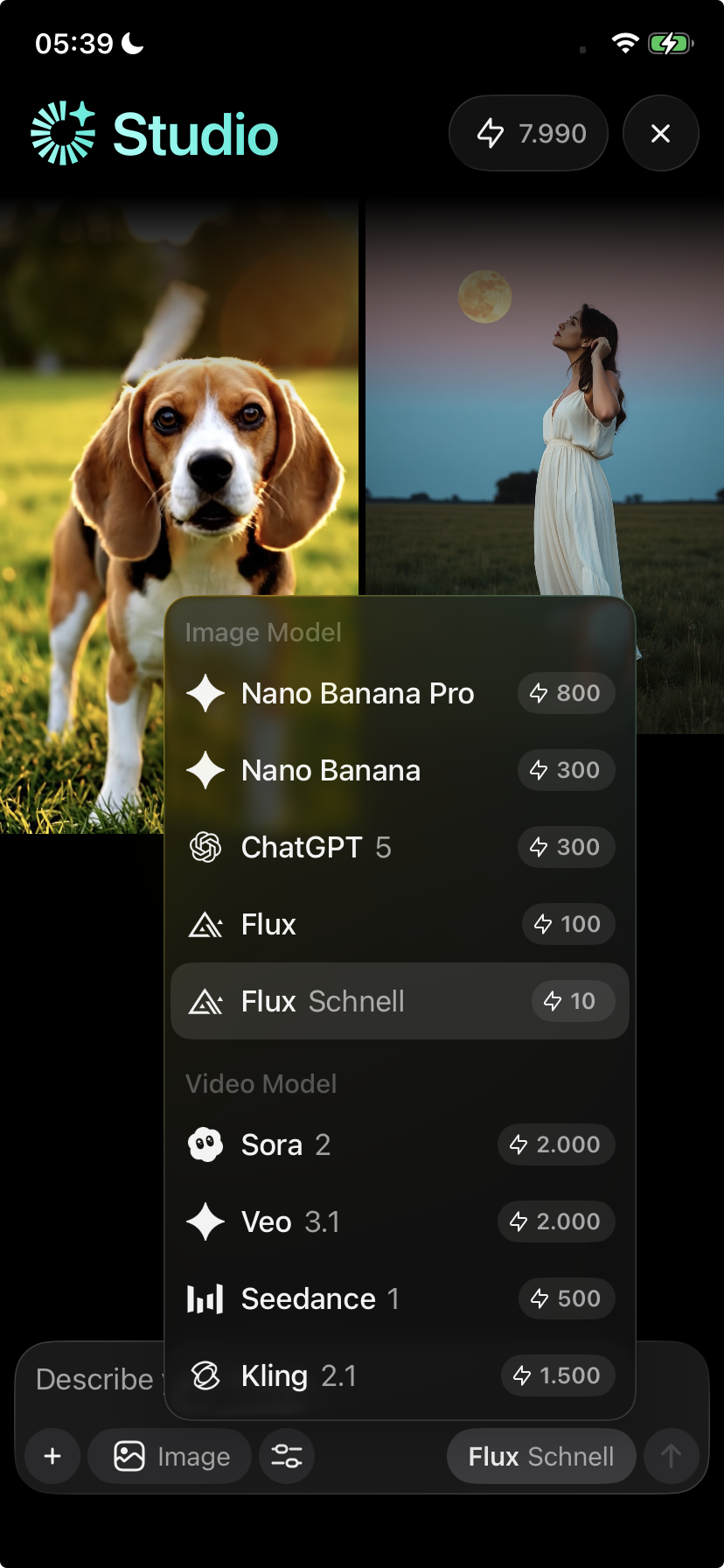
To get the best balance between quality and efficiency, choosing the right model is important.
To learn more about model recommendations and best practices, see Image and video generations.
When to be careful with credits
Be especially mindful of credit usage when:
Generating multiple variations at once
Working with videos
Switching models mid-project
Retrying the same prompt repeatedly
Small adjustments to prompts or models can help reduce wasted credits.
Common questions
Does chatting use credits?
No. Chat and text conversations are unlimited.
Do credits renew automatically?
Yes. Credits included with your subscription renew automatically.
Can unused credits roll over?
No. Unused credits do not roll over unless explicitly stated otherwise.
Can credits be refunded?
No. Credits cannot be refunded once used.
What next?
Learn how to improve results and reduce wasted credits in Image and video generations, or explore other tools like Chat and Playground.